
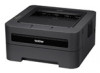
Brother International HL-2270DW Network Users Manual - English
Brother International HL-2270DW Manual
 |
UPC - 012502626749
View all Brother International HL-2270DW manuals
Add to My Manuals
Save this manual to your list of manuals |
Brother International HL-2270DW manual content summary:
- Brother International HL-2270DW | Network Users Manual - English - Page 1
network features of your Brother machine, see the Network Glossary. To download the latest manual, please visit the Brother Solutions Center at (http://solutions.brother.com/). You can also download the latest drivers and utilities for your machine, read FAQs and troubleshooting tips or learn about - Brother International HL-2270DW | Network Users Manual - English - Page 2
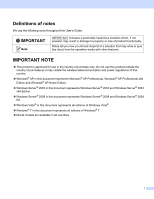
following icons throughout this User's Guide: IMPORTANT indicates a potentially hazardous wireless telecommunication and power regulations of that country. Windows® XP in this document represents Windows® XP Professional, Windows® XP Professional x64 Edition and Windows® XP Home Edition. Windows - Brother International HL-2270DW | Network Users Manual - English - Page 3
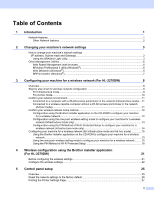
4 Wireless configuration using the Brother installer application (For HL-2270DW) 21 Before configuring the wireless settings 21 Configure the wireless settings...22 5 Control panel setup 25 Overview...25 Reset the network settings to the factory default 26 Printing the Printer Settings Page - Brother International HL-2270DW | Network Users Manual - English - Page 4
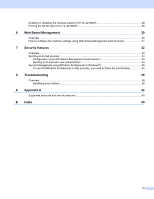
Enabling or disabling the wireless network (For HL-2270DW 28 Printing the WLAN report (For HL-2270DW 29 6 Web Based Management 30 Overview...30 How to configure the machine settings using Web Based Management (web browser 31 7 Security features 32 Overview...32 Sending an E-mail securely - Brother International HL-2270DW | Network Users Manual - English - Page 5
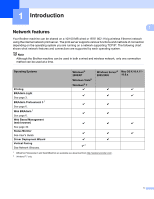
Light See page 3. BRAdmin Professional 3 1 See page 6. Web BRAdmin 1 See page 6. Web Based Management (web browser) See page 30. Status Monitor See User's Guide. Driver Deployment Wizard Vertical Pairing See Network Glossary. Windows® 2000/XP Windows Vista® Windows® 7 r Windows Server® Mac OS X 10 - Brother International HL-2270DW | Network Users Manual - English - Page 6
Introduction Other Network features 1 1 Security 1 Your Brother machine employs some of the latest network security and encryption protocols available. (See Security features on page 32.) 2 - Brother International HL-2270DW | Network Users Manual - English - Page 7
in current BRAdmin Light window. The default node name of the print server in the machine is "BRNxxxxxxxxxxxx" for a wired network or "BRWxxxxxxxxxxxx" for a wireless network. ("xxxxxxxxxxxx" is your machine's MAC Address / Ethernet Address.) • The default password for Brother print servers is - Brother International HL-2270DW | Network Users Manual - English - Page 8
Mac OS X or Macintosh HD (Startup Disk) / Library / Printers / Brother / Utilities / BRAdmin Light.jar file. b BRAdmin Light will search for new devices automatically. c Double-click the unconfigured device. Windows® Macintosh Note • If the print server is set to its factory default settings - Brother International HL-2270DW | Network Users Manual - English - Page 9
Changing your machine's network settings Windows® Macintosh 2 e Click OK. f With the correctly programmed IP address, you will see the Brother print server in the device list. 5 - Brother International HL-2270DW | Network Users Manual - English - Page 10
Node name for each Brother device on the network appears in BRAdmin Professional 3. The default Node name is "BRNxxxxxxxxxxxx" for a wired network or "BRWxxxxxxxxxxxx" for a wireless network. ("xxxxxxxxxxxx" is your machine's MAC Address / Ethernet Address.) Web BRAdmin (Windows®) 2 Web BRAdmin is - Brother International HL-2270DW | Network Users Manual - English - Page 11
download the software, visit us at http://solutions.brother.com/. 1 Internet Information Server 4.0 or Internet Information Services 5.0/5.1/6.0/7.0 BRPrint Auditor (Windows such as page counts, toner and drum status and the firmware version. In addition to reporting to Brother network management - Brother International HL-2270DW | Network Users Manual - English - Page 12
3 Configuring your machine for a wireless network (For HL-2270DW) 3 Overview 3 To connect your machine to your wireless network, we recommend you to follow the steps in the Quick Setup Guide using Brother installer application on the CD-ROM which we have provided with the machine. By using this - Brother International HL-2270DW | Network Users Manual - English - Page 13
) Temporarily using a USB or a network cable c Configure your machine for a wireless network. See page 15 See the Quick Setup Guide See page 15 See page 18 Installing the printer driver (See the Quick Setup Guide) Wireless configuration and installing the printer driver have been completed. 9 - Brother International HL-2270DW | Network Users Manual - English - Page 14
b Confirm your wireless network setup method. See page 12. Using the Brother installer application c Configure your machine for a wireless network. See page 15. See page 21 Installing the printer driver (See the Quick Setup Guide) Wireless configuration and installing the printer driver have been - Brother International HL-2270DW | Network Users Manual - English - Page 15
Configuring your machine for a wireless network (For HL-2270DW) Confirm your network environment 3 Connected to a computer with a WLAN access point/router in the network (Infrastructure mode) 3 1 3 4 2 3 1 WLAN access point/Router 2 Wireless network machine (your machine) 3 Wireless capable - Brother International HL-2270DW | Network Users Manual - English - Page 16
your machine to your wireless network and install the network software and printer driver which you need to complete the configuration of your machine for a wireless network. You will be guided by the on-screen instructions until you are able to use your Brother wireless network machine. You must - Brother International HL-2270DW | Network Users Manual - English - Page 17
your machine for a wireless network (For HL-2270DW) You can remotely configure the machine from a computer that is also on the network using a USB cable (A) 1. 3 A 1 You can configure the wireless settings of the machine using a USB cable temporarily connected to a wired or wireless computer. If - Brother International HL-2270DW | Network Users Manual - English - Page 18
your machine for a wireless network (For HL-2270DW) Configuration using the PIN Method of Wi-Fi Protected Setup to configure your machine for a wireless network (Infrastructure mode only) 3 If your WLAN access point/router (A) supports Wi-Fi Protected Setup, you can also configure using the PIN - Brother International HL-2270DW | Network Users Manual - English - Page 19
settings to the factory default on page 26) Using the Brother installer application on the CD-ROM to configure your machine for a wireless network 3 For installation, see the Quick Setup Guide. Using the one-push wireless setting mode to configure your machine for a wireless network 3 If your WLAN - Brother International HL-2270DW | Network Users Manual - English - Page 20
your machine for a wireless network (For HL-2270DW) How to configure your wireless machine, using the one-push wireless setting mode 3 a Make sure that the power cord is plugged in. b Turn on the machine and wait until the machine is in the Ready state. c Press the wireless setup button located - Brother International HL-2270DW | Network Users Manual - English - Page 21
Configuring your machine for a wireless network (For HL-2270DW) f Wait until the Ready LED of your machine error code on the printed report refer to Troubleshooting in the Quick Setup Guide. LED indications when using the one-push wireless setting mode LEDs Toner (Yellow) Drum (Yellow) Error - Brother International HL-2270DW | Network Users Manual - English - Page 22
your machine for a wireless network (For HL-2270DW) Using the PIN Method of Wi-Fi Protected Setup 3 If your WLAN access point/router supports Wi-Fi Protected Setup (PIN Method), you can configure the machine easily. The PIN (Personal Identification Number) Method is one of the connection - Brother International HL-2270DW | Network Users Manual - English - Page 23
® 7 as a Registrar, you can install the printer driver after the wireless configuration by following the on-screen instructions. If you want to install the full driver and software package, follow the steps in Quick Setup Guide for installation. 1 (Windows Vista®) Click the button and then Network - Brother International HL-2270DW | Network Users Manual - English - Page 24
settings to the factory default on page 26. A WLAN report will also be printed with the connection status. If there is an error code on the printed report refer to Troubleshooting in the Quick Setup Guide. LEDs Toner (Yellow) LED indications when using the one-push wireless setting mode Setting - Brother International HL-2270DW | Network Users Manual - English - Page 25
4 Wireless configuration using the Brother installer application (For HL-2270DW) 4 Before configuring the wireless settings 4 IMPORTANT • The following instructions will install your Brother machine in a network environment using the Brother installer application found on the CD-ROM we have - Brother International HL-2270DW | Network Users Manual - English - Page 26
Wireless configuration using the Brother installer application (For HL-2270DW) Configure the wireless settings 4 a Before configuring your machine we recommend you write down your wireless network settings. You will need this information before you continue with the configuration. Check and record - Brother International HL-2270DW | Network Users Manual - English - Page 27
Wireless configuration using the Brother installer application (For HL-2270DW) 4 Choose Wireless Network Connection and then click Next. 5 Choose Brother Peer-to-Peer Network Printer or Network Shared Printer, and then click Next. 6 When you choose Network Shared Printer, choose your machine's - Brother International HL-2270DW | Network Users Manual - English - Page 28
using the Brother installer application (For HL-2270DW) (Windows Vista®) 1 Click the button and then Control Panel. 2 Click Network and Internet and then the Network and Sharing Center and Sharing Center icon. 3 Click Connect to a network. 4 You can see the SSID of the wireless printer in the - Brother International HL-2270DW | Network Users Manual - English - Page 29
settings to the factory default See Reset the network settings to the factory default on page 26. Print the Printer Settings Page See Printing the Printer Settings Page on page 27. Enable or Disable the wireless network See Enabling or disabling the wireless network (For HL-2270DW) on page 28. 25 - Brother International HL-2270DW | Network Users Manual - English - Page 30
5 You can reset the print server back to its default factory settings (resetting all information such as the password and IP address information). Note • This function resets all wired and wireless network settings to the factory default. • You can also reset the print server back to its factory - Brother International HL-2270DW | Network Users Manual - English - Page 31
Node name: Node name appears on the Printer Settings Page. The default node name is "BRNxxxxxxxxxxxx" for a wired network or "BRWxxxxxxxxxxxx" for a wireless network. ("xxxxxxxxxxxx" is your machine's MAC Address / Ethernet Address.) The Printer Settings Page prints a report listing all the current - Brother International HL-2270DW | Network Users Manual - English - Page 32
Control panel setup Enabling or disabling the wireless network (For HL-2270DW) 5 If you want to switch the wireless network to enabled/disabled (disabled is the default), please follow these steps: a Make sure that the power cord is plugged in. b Turn on the machine and wait until the machine is - Brother International HL-2270DW | Network Users Manual - English - Page 33
Control panel setup Printing the WLAN report (For HL-2270DW) 5 The WLAN report prints your machine's wireless status report. If the wireless connection failed, check the error code on the printed report and refer to the Troubleshooting in the Quick Setup Guide. You can print the WLAN report using Go - Brother International HL-2270DW | Network Users Manual - English - Page 34
Software version information of the machine and print server Change network and machine configuration details Note We recommend Microsoft® Internet Explorer® 6.0 (or greater) or Firefox 3.0 (or greater) for Windows® and 6 Safari 3.0 (or greater) for Macintosh. Please also make sure that JavaScript - Brother International HL-2270DW | Network Users Manual - English - Page 35
Printer Settings Page on page 27.) • For Macintosh users, you can have easy access to the Web Based Management System by clicking the machine icon on the Status Monitor screen. For more information, see the User's Guide. c Click Network Configuration. d Enter a user name and a password. The default - Brother International HL-2270DW | Network Users Manual - English - Page 36
it. Your Brother machine employs configure them. You can configure following security features: Sending an E-mail securely (See Sending an E-mail securely on page 33.) Secure Management using BRAdmin Professional 3 (Windows®) (See Secure Management using BRAdmin Professional 3 (Windows®) on page - Brother International HL-2270DW | Network Users Manual - English - Page 37
your browser (where "printer's IP address" is the printer's IP address). For example: http://192.168.1.2/ c Click Network Configuration. d Enter a user name and a password. The default User Name is "admin" and the default Password is 7 "access". e Click Configure Protocol. f Click Advanced - Brother International HL-2270DW | Network Users Manual - English - Page 38
Web Based Management. This is useful if your ISP (Internet Service Provider) implements the "Outbound Port 25 Blocking (OP25B)" service. By changing the SMTP port number to a specific Authentication Method, you need to configure the POP3 settings. You can also use the APOP method if needed. 7 34 - Brother International HL-2270DW | Network Users Manual - English - Page 39
(web browser). (See How to configure the machine settings using Web Based Management (web browser) on page 31.) If you are managing a mixed group of older print servers 2 and the new print servers with BRAdmin Professional 3, we recommend using a different password in each group. This will ensure - Brother International HL-2270DW | Network Users Manual - English - Page 40
below 8 I cannot complete the wireless network setup configuration. (See page 36.) The Brother machine is not found on the network during the printer driver installation. (See page 37.) The Brother machine cannot print over the network. (See page 37.) The Brother machine is not found on the - Brother International HL-2270DW | Network Users Manual - English - Page 41
the wireless configuration. Is there anything else I can do? Interface wireless wireless wireless Solution Confirm the MAC address of the Brother machine is allowed in the filter. You can find the MAC Address by printing the Printer Settings Page. (See Printing the Printer Settings Page on page 27 - Brother International HL-2270DW | Network Users Manual - English - Page 42
wireless Confirm the IP address and the Subnet Mask Verify that both the IP addresses and Subnet Masks of your computer and the Brother (Windows® 2000 Professional/XP/XP Professional x64 Edition/Windows Vista®/Windows® 7) You must log on with Administrator rights. • Make sure that the Brother - Brother International HL-2270DW | Network Users Manual - English - Page 43
Files (x86), Browny02, Brother, BrotherNetTool.ex to run the program. Note If the User Account Control screen appears, (Windows Vista®) Click Continue. (Windows® 7) Click Yes. 3 Follow the on screen instructions. 4 Check the diagnosis by printing the Printer Settings Page. 8 Note The Network - Brother International HL-2270DW | Network Users Manual - English - Page 44
wireless connection. (For how to print, see Printing the WLAN report (For HL-2270DW) on page 29.) If there is an error code on the printed WLAN report, see Troubleshooting in the Quick Setup Guide. See The Brother machine is not found on the network during the printer driver installation. on page - Brother International HL-2270DW | Network Users Manual - English - Page 45
report (For HL-2270DW) on page 29.) If there is an error code on the printed WLAN report see Troubleshooting in the Quick Setup Guide. I have checked and tried all of above, however, I'm still having problems. Is there anything else I can do? wired/ wireless See the instructions supplied with - Brother International HL-2270DW | Network Users Manual - English - Page 46
Web Services (Print) APOP, POP before SMTP, SMTP-AUTH Wireless 1 Wireless WEP 64/128 bit, WPA-PSK (TKIP/AES), WPA2-PSK (AES), APOP, POP before SMTP, SMTP-AUTH Wi-Fi Certification Mark License, Wi-Fi Protected Setup (WPS) A Certification 1 Identifier Mark License, AOSS Logo 1 For HL-2270DW 42 - Brother International HL-2270DW | Network Users Manual - English - Page 47
7 D Driver Deployment Wizard 1 F Factory default 26 H Hyper Text Transfer Protocol 6 I Infrastructure mode 11 M MAC Address 3, 6, 27 N Network Connection Repair Tool 38 O one-push 13, 15 Operating systems 1 P PBC 12, 13 PIN Method 14, 18 POP before SMTP 33 Printer Settings Page 27
-
 1
1 -
 2
2 -
 3
3 -
 4
4 -
 5
5 -
 6
6 -
 7
7 -
8
-
9
-
10
-
11
-
12
-
13
-
14
-
15
-
16
-
17
-
18
-
19
-
20
-
21
-
22
-
23
-
24
-
25
-
26
-
27
-
28
-
29
-
30
-
31
-
32
-
33
-
34
-
35
-
36
-
37
-
38
-
39
-
40
-
41
-
42
-
43
-
44
-
45
-
46
-
47
 |
 |

NETWORK
USER’S GUIDE
Multi-Protocol On-board Ethernet Print Server and Wireless
Ethernet Print Server
This Network User's Guide provides useful information of wired
and wireless network settings and security settings using your
Brother machine. You can also find supported protocol
information and detailed troubleshooting tips.
To find basic information about network and advanced network
features of your Brother machine, see the
Network Glossary
.
To download the latest manual, please visit the Brother Solutions
Center at (http://solutions.brother.com/)
. You can also download
the latest drivers and utilities for your machine, read FAQs and
troubleshooting tips or learn about special printing solutions from
the Brother Solutions Center.
Version 0
ENG