
Sony CDX-CA700X Operating Instructions (primary manual)
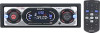
Sony CDX-CA700X - Fm/am Compact Disc Player Manual
 |
View all Sony CDX-CA700X manuals
Add to My Manuals
Save this manual to your list of manuals |
Sony CDX-CA700X manual content summary:
- Sony CDX-CA700X | Operating Instructions (primary manual) - Page 1
. Model No. CDX-CA720X/CA700X/CA705M Serial No. For installation and connections, see the supplied installation/connections manual. En ce qui concerne l'installation et les connexions, consulter le manuel d'installation/raccordement fourni. CDX-CA720X CDX-CA700X CDX-CA705M © 2002 Sony Corporation - Sony CDX-CA700X | Operating Instructions (primary manual) - Page 2
receiver is connected. - Consult the dealer or an experienced radio/TV technician for help. You are cautioned that any changes or modifications not expressly approved in this manual could void your authority to operate this equipment. Welcome ! Thank you for purchasing this Sony Compact Disc Player - Sony CDX-CA700X | Operating Instructions (primary manual) - Page 3
Table of Contents Location of controls 4 Precautions 6 Notes on discs 6 Getting Started Resetting the unit 7 Detaching the front panel 8 Setting the clock 9 CD Player CD/MD Unit (optional) Playing a disc 9 Display items 10 Playing tracks repeatedly - Repeat Play 11 Playing tracks in random - Sony CDX-CA700X | Operating Instructions (primary manual) - Page 4
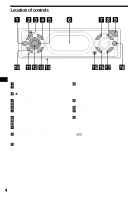
of the unit)*2 The AM (FM) tuning interval is factory-set to the 10 k (200 k) position. Make sure that the 9 k (50 k) position is selected. o Receptor for the card remote commander p SOUND button 17 q ENTER button To enter a setting. r EQ7 button 19 *1 Warning when installing in a car without an ACC - Sony CDX-CA700X | Operating Instructions (primary manual) - Page 5
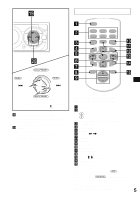
VOL The corresponding buttons of the card remote commander control the same functions as those on this unit. a DSPL button b Number buttons (1) REP (2) SHUF To store stations, receive stored stations. c DSO button d MENU button e SOURCE button f SEEK ( - Sony CDX-CA700X | Operating Instructions (primary manual) - Page 6
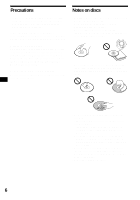
car has been parked in direct sunlight, allow the unit to cool off before operating it. • Power antennas will extend automatically while the unit is operating. If you have any questions or problems concerning your unit that are not covered in this manual, please consult your nearest Sony 8 cm CDs. 6 - Sony CDX-CA700X | Operating Instructions (primary manual) - Page 7
button with a pointed object, such as a ball-point pen. RESET button Note Pressing the RESET button will erase the clock setting and some stored contents. These marks denote that a disc is not for audio use. • Some CD-Rs/CD-RWs (depending on the equipment used for its recording or the condition - Sony CDX-CA700X | Operating Instructions (primary manual) - Page 8
If you connect an optional amplifier and do not use the built-in amplifier, the beep sound will be deactivated. 1 Press (OFF)*. CD/MD playback or radio reception stops (the key illumination and display remain on). * If your car has no ACC position on the ignition switch, be sure to turn the unit off - Sony CDX-CA700X | Operating Instructions (primary manual) - Page 9
set the minute. 2 Press (ENTER). CD Player CD/MD Unit (optional) In addition to playing a CD with this unit, you can also control external CD/MD units. If you connect MP3 playable CD units (eg. MP3 CD changer), you can play MP3 files; compressed audio files with quality sound. See "MP3 playable CD - Sony CDX-CA700X | Operating Instructions (primary manual) - Page 10
artist name. Notes • Some characters cannot be displayed. • For some CD TEXT discs with very many characters, information may not scroll. • This unit cannot display the artist name for each track of a CD TEXT disc. Tip When A.SCRL (Auto Scroll) is set to OFF and the disc/ track name is changed, the - Sony CDX-CA700X | Operating Instructions (primary manual) - Page 11
repeat a track. • REP-DISC* - to repeat a disc. * Available only when one or more optional CD/MD units are connected. During playback, press (1) on the card remote commander repeatedly until the desired setting appears in the display. Repeat Play starts. To return to normal play mode, select "REPOFF - Sony CDX-CA700X | Operating Instructions (primary manual) - Page 12
find out about other items that can be displayed, see page 10. Erasing the Disc Memo 1 Press (SOURCE) repeatedly to select "CD." 2 Press (MODE) repeatedly to select the CD unit storing the Disc Memo. 3 Press (MENU), then press either side of (DISC/PRESET) repeatedly until "NAME DEL" appears. 4 Press - Sony CDX-CA700X | Operating Instructions (primary manual) - Page 13
) repeatedly to select the radio. 2 Press (MODE) repeatedly to select the band. 3 Press (MENU), then press either side of (DISC/PRESET) repeatedly until "BTM" appears. 4 Press (ENTER). A beep sounds when the setting is stored. Notes • If only a few stations can be received due to weak signals, some - Sony CDX-CA700X | Operating Instructions (primary manual) - Page 14
Storing only the desired stations You can manually preset the desired stations on any chosen number button. 1 Press (SOURCE) repeatedly to select the radio. 2 Press (MODE) repeatedly to select the band. 3 Press either side of (SEEK) to tune in the station that you want to store. 4 Press the desired - Sony CDX-CA700X | Operating Instructions (primary manual) - Page 15
of performing steps 2 and 3. You can also complete the operation by pressing (LIST) for 2 seconds instead of step 5. Erasing the station name 1 During radio reception, press (MENU), then press either side of (DISC/PRESET) repeatedly until "NAME DEL" appears. 2 Press (ENTER). 3 Press either side - Sony CDX-CA700X | Operating Instructions (primary manual) - Page 16
automatically. Rotate, hold, and release to: - Fast-forward/reverse a track. - Find a station manually. By pushing in and rotating the control PRESET/DISC control Push in and rotate the control to: - Receive preset stations. - Change the disc*. * When an optional CD/MD unit is connected. 16 - Sony CDX-CA700X | Operating Instructions (primary manual) - Page 17
. Tip You can also change the operative direction of these controls with the unit (page 18). Quickly attenuating the sound (With the rotary commander or the card remote commander) Press (ATT) on the rotary commander or card remote commander. After "ATT-ON" momentarily appears, "ATT" appears in the - Sony CDX-CA700X | Operating Instructions (primary manual) - Page 18
mode) (page 13) - Select "ON" to only tune into stations with stronger signals. • MONO ON/OFF (Monaural mode) (page 13) - Select "ON" to hear FM stereo broadcast in monaural. Select "OFF" to return to normal mode. • IF AUTO/WIDE (page 13) SND (Sound) • EQ7 TUNE (page 19) - to adjust the equalizer - Sony CDX-CA700X | Operating Instructions (primary manual) - Page 19
clear. The DSO (Dynamic Soundstage Organizer) function creates a more ambient sound as if there were speakers in the dashboard (virtual speakers). You can store the DSO setting for each source. 1 Press (SOURCE) to select a source (radio, CD, or MD). 2 Press (DSO) repeatedly until "DSO- ON" appears - Sony CDX-CA700X | Operating Instructions (primary manual) - Page 20
Notes • If a disc with no MP3 files (tracks) is inserted, "CD" appears in the disc type display to start playback but there will be no sound. • Before playing a track, this unit Tip When A.SCRL (Auto Scroll) is set to OFF and the album/track name is changed, the album/track name does not scroll. 20 - Sony CDX-CA700X | Operating Instructions (primary manual) - Page 21
a disc. *1 Available only when optional CD unit with the MP3 file control function is connected. *2 Available only when one or more optional CD/MD units are connected. During playback, press (1) on the card remote commander repeatedly until the desired setting appears in the display. Repeat Play - Sony CDX-CA700X | Operating Instructions (primary manual) - Page 22
such a case, consult your nearest Sony dealer. Notes • For safety, turn approximately 1 year. (The service life may be shorter, depending weak, the range of the card remote commander becomes shorter. Replace the battery assure a good contact. • Be sure to observe the correct polarity when installing the - Sony CDX-CA700X | Operating Instructions (primary manual) - Page 23
Removing the unit 1 Remove the front cover 1 Detach the front panel (page 8). 2 Press the clip inside the front cover with a thin screwdriver. 3 Repeat step 2 for the other side. 2 Remove the unit 1 Use a thin screwdriver to push in the clip on the left side of the unit, then pull out the left side - Sony CDX-CA700X | Operating Instructions (primary manual) - Page 24
(2 lb 10 oz.) Card remote commander (1) Parts for installation and connections (1 set) Front panel case (1) Rotary commander RM-X4S BUS cable (supplied with an RCA pin cord) RC-61 (1 m), RC-62 (2 m) CD changer (10 discs) CDX-757MX, CDX-656 CD changer (6 discs) CDX-T70MX, CDX-T69 MD changer (6 discs - Sony CDX-CA700X | Operating Instructions (primary manual) - Page 25
60°. • The unit is not installed in a sturdy part of the car. The sound skips. Dirty or defective disc. Radio reception Preset tuning is not possible. • Store the correct frequency in the memory. • The broadcast signal is too weak. The stations cannot be received. The sound is hampered by noises - Sony CDX-CA700X | Operating Instructions (primary manual) - Page 26
in the MP3 playable CD unit. t Insert a music CD in the MP3 playable CD unit. NOTREADY The lid of the MD unit is open or the MDs are not inserted properly. t Close the lid or insert the MDs properly. RESET The CD/MD unit cannot be operated because of some problem. t Press the RESET button on - Sony CDX-CA700X | Operating Instructions (primary manual) - Page 27
Messages L.SEEK +/- The Local Seek mode is on during automatic tuning (page 13). " " or " " You have reached the beginning or the end of the disc and you cannot go any further. 27 - Sony CDX-CA700X | Operating Instructions (primary manual) - Page 28
. CDX-CA705M uniquement: Cette étiquette est située sur la partie inférieure du châssis. CAUTION INVISIBLE LASER RADIATION WHEN OPEN DO NOT STARE INTO BEAM OR VIEW DIRECTLY WITH OPTICAL INSTRUMENTS Cette étiquette est située sur le châssis interne de l'unité du lecteur. Le logo "XM Ready" indique - Sony CDX-CA700X | Operating Instructions (primary manual) - Page 29
CD/MD en option Radio Mémorisation automatique des stations - Mémorisation des meilleurs accords (BTM 13 Syntonisation des stations mémorisées . . . . 14 Mémorisation des stations son émis (DSO 20 Lecteur CD compatible MP3 (en option) Écoute d'un fichier MP3 21 Rubriques d'affichage 22 Lecture - Sony CDX-CA700X | Operating Instructions (primary manual) - Page 30
LIS SC/PRES SEEK SC/PRESE EQ7 UND ENT CDX-CA720X/CA700X/CA705M Pour plus de détails, reportez-vous aux pages indiquées. a Touche DSO 20 b Touche )*1 8, 10 k Touche RESET (située à l'avant de l'appareil, derrière la façade) 8 l Touche SOURCE (Mise sous tension/ Radio/CD/MD) Pour sélectionner la - Sony CDX-CA700X | Operating Instructions (primary manual) - Page 31
-télécommande servent aux mêmes fonctions que les touches correspondantes sur l'appareil. a Touche DSPL b Touches numériques (1) REP (2) SHUF Pour mémoriser des stations ou syntoniser des stations mémorisées. c Touche DSO d Touche MENU e Touche SOURCE f Touches SEEK ( - Sony CDX-CA700X | Operating Instructions (primary manual) - Page 32
des questions ou des problèmes au sujet du fonctionnement de cet appareil qui ne sont pas abordés dans ce mode d'emploi, consultez votre détaillant Sony. Condensation Les jours de pluie et dans les régions très humides, de la condensation peut s'accumuler dans les lentilles et l'écran d'affichage de - Sony CDX-CA700X | Operating Instructions (primary manual) - Page 33
les détergents ordinaires ou les antistatiques en aérosol destinés aux disques en vinyle. • N'apposez pas d'étiquettes sur les car ils pourraient endommager le lecteur. • Vous ne pouvez pas écouter des CD de 8 cm. • Il est possible que ce lecteur ne puisse pas lire certains disques CD-R ou CD - Sony CDX-CA700X | Operating Instructions (primary manual) - Page 34
sur la touche RESET avec un objet pointu comme un stylo à bille. Touche RESET Remarque Une pression sur la touche RESET efface l'heure et est désactivée. 1 Appuyez sur (OFF)*. La lecture du disque CD ou MD ou la réception radio s'arrête (l'éclairage des touches et l'affichage restent allumés). - Sony CDX-CA700X | Operating Instructions (primary manual) - Page 35
Installation de la façade Enfilez l'orificeA de la façade sur la tige B sur l'appareil, puis poussez doucement sur le côté gauche pour l'engager en position. Appuyez sur (SOURCE) (ou insérez un CD) pour faire fonctionner l'appareil. A B Réglage de l'horloge L'horloge numérique fonctionne suivant un - Sony CDX-CA700X | Operating Instructions (primary manual) - Page 36
CD, de commander des lecteurs CD ou MD externes. Si vous raccordez des lecteurs de CD compatibles MP3 (p. ex. un changeur CD MP3), vous pouvez faire la lecture de MP3 (./>) - Accès [une fois pour chaque piste] automatique aux titres avancer ou reculer (SEEK) (m/M) rapidement [maintenir la - Sony CDX-CA700X | Operating Instructions (primary manual) - Page 37
peut pas afficher le nom de l'artiste de chaque piste d'un disque CD TEXT. Conseil Lorsque le défilement automatique (A.SCRL) est désactivé (OFF répéter tout le disque. * Disponible uniquement lorsqu'un ou plusieurs lecteurs CD ou MD en option sont raccordés. En cours de lecture, appuyez plusieurs - Sony CDX-CA700X | Operating Instructions (primary manual) - Page 38
que rubrique d'affichage, le mémo de disque est toujours affiché en priorité par rapport aux informations CD TEXT d'origine. Pour afficher l'information Appuyez sur (DSPL) pendant la lecture d'un disque CD ordinaire ou CD TEXT. Conseil Pour en savoir plus sur les autres rubriques qui peuvent être - Sony CDX-CA700X | Operating Instructions (primary manual) - Page 39
vous souhaitez effacer, essayez de sélectionner un autre lecteur CD à l'étape 2. Radio L'appareil peut mémoriser jusqu'à 6 stations pour chaque bande radio (FM1, FM2, FM3, AM1 et AM2). Attention Pour syntoniser des stations pendant que vous conduisez, nous vous conseillons d'utiliser la fonction - Sony CDX-CA700X | Operating Instructions (primary manual) - Page 40
locale pour limiter la recherche aux stations dont les signaux sont plus syntonisation manuelle). Si la réception stéréo FM est mauvaise Sélectionnez le mode de radio. 2 Appuyez plusieurs fois sur (MODE) pour sélectionner la bande. 3 Appuyez sur l'un des côtés de (SEEK) pour syntoniser la station - Sony CDX-CA700X | Operating Instructions (primary manual) - Page 41
également compléter l'opération en appuyant sur (LIST) pendant deux secondes au lieu d'effectuer l'étape 5. Suppression du nom de la station 1 Pendant la réception radio, appuyez sur (MENU), puis appuyez plusieurs fois sur un des côtés de la touche (DISC/PRESET) jusqu'à ce que "NAME DEL" s'affiche - Sony CDX-CA700X | Operating Instructions (primary manual) - Page 42
l'appareil sous tension (MODE) changer de mode de fonctionnement (fréquence radio/lecteur CD/lecteur MD*1) (ATT) atténuer le son (OFF)*2 arrêter la lecture d'un disque ou la réception radio/mettre l'appareil hors tension (SOUND) régler les paramètres du menu son (DSPL) changer de rubrique - Sony CDX-CA700X | Operating Instructions (primary manual) - Page 43
de radio. Tournez la commande, maintenez-la et relâchez-la pour: - avancer ou reculer à vitesse rapide. - trouver une station manuellement. Fonctionnement par pression et rotation de la commande Appuyez sur (SOUND) pendant 2 secondes tout en appuyant sur la commande VOL. Conseil Vous pouvez - Sony CDX-CA700X | Operating Instructions (primary manual) - Page 44
l'aide du satellite de commande, appuyez sur (SOUND), puis tournez la commande VOL. Remarque Effectuez Les rubriques suivantes peuvent être réglées : SET (configuration) • CLOCK (horloge) (page 9) sélectionné que lorsque l'appareil est éteint (CDX-CA720X uniquement). Remarque Si le volume est régl - Sony CDX-CA700X | Operating Instructions (primary manual) - Page 45
stations dont les signaux sont puissants. • MONO ON/OFF (mode mono) (page 14) - Sélectionnez "ON" pour écouter les émissions FM de réglage à l'autre ("SET", "DSPL", "P/M", "SND" correspond à un type de musique: XPLOD, VOCAL, CLUB, JAZZ, NEW pour sélectionner une source (radio, CD ou MD). 2 Appuyez - Sony CDX-CA700X | Operating Instructions (primary manual) - Page 46
du répartiteur dynamique du son émis (DSO) Si vos haut-parleurs sont installés dans la partie inférieure des portières, le son est émis à chaque source. 1 Appuyez sur (SOURCE) pour sélectionner une source (radio, CD ou MD). 2 Appuyez plusieurs fois sur (DSO) jusqu'à ce que FM, réglez DSO à OFF. 20 - Sony CDX-CA700X | Operating Instructions (primary manual) - Page 47
sur (MODE) jusqu'à ce que l'indication correspondant au lecteur CD MP3 s'affiche ("CD1", "CD2", etc.) . La lecture commence. Pour Appuyez sur interrompre la lecture (OFF) éjecter le disque (OPEN), puis Z sauter des pistes - Accès automatique aux titres (SEEK) (./>) [une fois pour chaque piste - Sony CDX-CA700X | Operating Instructions (primary manual) - Page 48
- pour répéter un album. • REP-DISC*2 - pour répéter tout le disque. *1 Disponible uniquement lorsqu'un appareil CD MP3 en option est raccordé. *2 Disponible uniquement lorsqu'un ou plusieurs lecteurs CD ou MD en option sont raccordés. En cours de lecture, appuyez plusieurs fois sur (1) sur la minit - Sony CDX-CA700X | Operating Instructions (primary manual) - Page 49
aléatoire les albums du lecteur CD MP3 (en option) utilisé. • CD ou MD (en option) CD ou MD raccordés, y compris cet appareil. *1 Disponible uniquement lorsqu'un appareil CD MP3 en option est raccordé. *2 Disponible uniquement lorsqu'un ou plusieurs lecteurs CD lecteurs CD à Sony. Fusible - Sony CDX-CA700X | Operating Instructions (primary manual) - Page 50
bon contact. • Veillez à respecter la polarité lors de l'installation de la pile. • Ne tenez pas la pile avec des pinces métalliques car cela pourrait entraîner un court-circuit. ATTENTION Utilisée de haut 4 mm 2 Répétez l'étape 1 du côté droit. 3 Faites glisser l'appareil hors de son support. 24 - Sony CDX-CA700X | Operating Instructions (primary manual) - Page 51
Caractéristiques techniques Lecteur CD Rapport signal/bruit Réponse en fréquence Pleurage et scintillement Radio 90 dB 10 à 20.000 Hz En dessous du seuil de mesure FM Plage de syntonisation CDX-CA720X/CA700X: 87,5 - 107,9 MHz CDX-CA705M: Intervalle de syntonisation FM; 50 kHz/200 kHz, - Sony CDX-CA700X | Operating Instructions (primary manual) - Page 52
pour plus de détails. Les stations mémorisées et l'heure correcte de la voiture destiné aux accessoires. L'appareil n'est pas CD. Appuyez sur la touche RESET. Le son est irrégulier en raison de vibrations. • L'appareil est installé suivant un angle de plus de 60°. • L'appareil n'est pas install - Sony CDX-CA700X | Operating Instructions (primary manual) - Page 53
audio a été inséré dans un lecteur CD compatible MP3. t Insérez un disque audio dans le lecteur CD MP3. NOTREADY Le couvercle du lecteur MD est ouvert ou les MD ne sont pas insérés correctement. t Fermez le couvercle ou insérez correctement les MD. RESET Le lecteur CD/MD ne peut pas fonctionner en - Sony CDX-CA700X | Operating Instructions (primary manual) - Page 54
Si ces solutions ne permettent pas d'améliorer la situation, consultez votre détaillant Sony le plus proche. Messages L.SEEK +/- Le mode de recherche locale est activé en cours de syntonisation automatique (page 14). " " ou " " Vous avez atteint le début - Sony CDX-CA700X | Operating Instructions (primary manual) - Page 55
- Sony CDX-CA700X | Operating Instructions (primary manual) - Page 56
Sony Corporation Printed in Thailand
-
 1
1 -
 2
2 -
 3
3 -
 4
4 -
 5
5 -
 6
6 -
 7
7 -
8
-
9
-
10
-
11
-
12
-
13
-
14
-
15
-
16
-
17
-
18
-
19
-
20
-
21
-
22
-
23
-
24
-
25
-
26
-
27
-
28
-
29
-
30
-
31
-
32
-
33
-
34
-
35
-
36
-
37
-
38
-
39
-
40
-
41
-
42
-
43
-
44
-
45
-
46
-
47
-
48
-
49
-
50
-
51
-
52
-
53
-
54
-
55
-
56
 |
 |
Operating Instructions
Mode d’emploi
Owner’s Record
The model and serial numbers are located on the bottom of the unit.
Record these numbers in the space provided below.
Refer to these numbers whenever you call upon your Sony dealer regarding this product.
Model No. CDX-CA720X/CA700X/CA705M Serial No.
CDX-CA720X
CDX-CA700X
CDX-CA705M
For installation and connections, see the supplied installation/connections manual.
En ce qui concerne l’installation et les connexions, consulter le manuel
d’installation/raccordement fourni.
© 2002 Sony Corporation
3-237-887-
11
(1)
US
FR
FM
/
AM
Compact Disc
Player