
HP 510 Wireless (Select Models Only) - Windows Vista and Windows XP
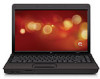
HP 510 - Notebook PC Manual
 |
UPC - 883585387021
View all HP 510 manuals
Add to My Manuals
Save this manual to your list of manuals |
HP 510 manual content summary:
- HP 510 | Wireless (Select Models Only) - Windows Vista and Windows XP - Page 1
Wireless (Select Models Only) User Guide - HP 510 | Wireless (Select Models Only) - Windows Vista and Windows XP - Page 2
, L.P. Windows is a U.S. registered trademark of Microsoft Corporation. Bluetooth is a trademark owned by its proprietor and used by Hewlett-Packard Company under license. The information contained herein is subject to change without notice. The only warranties for HP products and services are set - HP 510 | Wireless (Select Models Only) - Windows Vista and Windows XP - Page 3
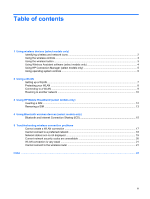
another network ...10 3 Using HP Mobile Broadband (select models only) Inserting a SIM ...12 Removing a SIM ...13 4 Using Bluetooth wireless devices (select models only) Bluetooth and Internet Connection Sharing (ICS 15 5 Troubleshooting wireless connection problems Cannot create a WLAN connection - HP 510 | Wireless (Select Models Only) - Windows Vista and Windows XP - Page 4
iv - HP 510 | Wireless (Select Models Only) - Windows Vista and Windows XP - Page 5
HP Mobile Broadband Module-A wireless wide area network (WWAN) device that provides access to information wherever mobile network operator service computers, phones, printers, headsets, support one or more of the following IEEE industry standards: ● 802.11b, the first popular standard, supports - HP 510 | Wireless (Select Models Only) - Windows Vista and Windows XP - Page 6
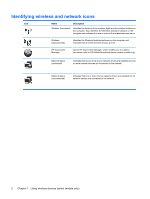
on the computer and indicates that one or more of the wireless devices are on. Wireless (disconnected) Identifies the Wireless Assistant software on the computer and indicates that all of the wireless devices are off. HP Connection Manager Opens HP Connection Manager, which enables you to - HP 510 | Wireless (Select Models Only) - Windows Vista and Windows XP - Page 7
in this guide as the wireless button) ● Wireless Assistant software (select models only) ● HP Connection Manager software (select models indicates the overall power state of your wireless devices, not the status of individual devices. If the wireless light is blue, at least one wireless device is - HP 510 | Wireless (Select Models Only) - Windows Vista and Windows XP - Page 8
1. Select Start > Control Panel > Mobile PC > Windows Mobility Center. 2. Click the wireless icon HP Wireless Assistant icon in notification area. 5. Click Apply. For more information, refer to the Wireless Assistant software Help: 1. Open Wireless Assistant by clicking the wireless icon in Windows - HP 510 | Wireless (Select Models Only) - Windows Vista and Windows XP - Page 9
Manager > HP Connection Manager. For more details about using Connection Manager, refer to the Connection Manager software Help. Using operating system controls Some operating systems also offer a way to manage integrated wireless devices and the wireless connection. For example, Windows provides - HP 510 | Wireless (Select Models Only) - Windows Vista and Windows XP - Page 10
and wired computers to share an Internet connection, a printer, and files without requiring additional pieces of hardware or software. To use the WLAN device in your computer, you must connect to a WLAN infrastructure (provided through a service provider or a public or corporate network). 6 Chapter - HP 510 | Wireless (Select Models Only) - Windows Vista and Windows XP - Page 11
to the Internet, you need the following equipment: ● A broadband modem (either DSL or cable) (1) and high-speed Internet service purchased from an Internet service provider (ISP) ● A wireless router (purchased separately) (2) ● The wireless computer (3) The illustration below shows an example of - HP 510 | Wireless (Select Models Only) - Windows Vista and Windows XP - Page 12
foil casual eavesdropping rather than more powerful forms of attack-it is essential Firewalls are available in many varieties, both software and hardware. Some networks use a combination transmitted over the network. However, instead of using one static security key for encryptions as WEP does, WPA - HP 510 | Wireless (Select Models Only) - Windows Vista and Windows XP - Page 13
connection or network. A list of options is displayed. You can choose to manually search for and connect to a network or to create a new network connection. 's instructions included with your wireless router and other WLAN equipment ● Information and Web site links provided in Help and Support For - HP 510 | Wireless (Select Models Only) - Windows Vista and Windows XP - Page 14
to another network When you move your computer within range of another WLAN, Windows attempts to connect to that network. If the attempt is successful, your computer is automatically connected to the new network. If Windows does not recognize the new network, follow the same procedure you used - HP 510 | Wireless (Select Models Only) - Windows Vista and Windows XP - Page 15
on the code division multiple access (CDMA) telecommunications standard. You may need the HP Mobile Broadband Module serial number to activate mobile broadband service. The serial number is printed on a label inside the battery bay of your computer. Some mobile network operators require the use of - HP 510 | Wireless (Select Models Only) - Windows Vista and Windows XP - Page 16
the SIM into the SIM slot, and gently push the SIM into the slot until it is firmly seated. 8. Replace the battery. NOTE: HP Mobile Broadband will be disabled if the battery is not replaced. 9. Reconnect external power. 10. Reconnect external devices. 11. Turn on the computer. 12 Chapter 3 Using - HP 510 | Wireless (Select Models Only) - Windows Vista and Windows XP - Page 17
. 2. Close the display. 3. Disconnect all external devices connected to the computer. 4. Unplug the power cord from the AC outlet. 5. Turn the computer upside down on a flat surface, with the battery bay toward you. 6. Remove the battery. 7. Press in on the SIM (1), and then remove it from the slot - HP 510 | Wireless (Select Models Only) - Windows Vista and Windows XP - Page 18
cable connections that traditionally link electronic devices such as the following: ● Computers (desktop, notebook, PDA) ● Phones (cellular, cordless, smart phone) ● Imaging devices (printer, camera) ● Audio devices (headset, speakers) Bluetooth devices provide peer-to-peer capability that allows - HP 510 | Wireless (Select Models Only) - Windows Vista and Windows XP - Page 19
Sharing (ICS) HP does not recommend setting up one computer with Bluetooth Bluetooth, and Internet Connection Sharing (ICS) is enabled on one of the computers, the other computers may not be able to computer and wireless devices including cellular phones, printers, cameras, and PDAs. The inability to - HP 510 | Wireless (Select Models Only) - Windows Vista and Windows XP - Page 20
5 Troubleshooting wireless connection problems Some possible causes for wireless connection problems include the following: ● Wireless device is the sequence of possible solutions to your network connection problem, be sure that device drivers are installed for all wireless devices. Use the - HP 510 | Wireless (Select Models Only) - Windows Vista and Windows XP - Page 21
tasks such as installing software, running utilities, or changing Windows settings. Refer to Windows Help and Support for more information. 1. driver for the WLAN device is not properly installed. For more information on troubleshooting WLANs, refer to the Web site links provided in Help and Support - HP 510 | Wireless (Select Models Only) - Windows Vista and Windows XP - Page 22
search results, click Network and Sharing Center. 3. In the left pane, click Diagnose and repair. The Network connections window is displayed, and Windows resets your network device and attempts to reconnect to one of the preferred networks. 18 Chapter 5 Troubleshooting wireless connection problems - HP 510 | Wireless (Select Models Only) - Windows Vista and Windows XP - Page 23
your Internet browser and go to http://www.hp.com/support. 2. Select your country or region. 3. Click the option for software and driver downloads, and then type your computer model number in the search box. 4. Press enter, and then follow the on-screen instructions. NOTE: If the WLAN device you are - HP 510 | Wireless (Select Models Only) - Windows Vista and Windows XP - Page 24
your computer to the network. ● For a network connected to your personal wireless router, review the router user guide for instructions on setting up the same codes on both the router and the WLAN device. ● 4. Click OK to save these settings. 20 Chapter 5 Troubleshooting wireless connection problems - HP 510 | Wireless (Select Models Only) - Windows Vista and Windows XP - Page 25
Cannot connect to the wireless router If you are trying to connect to the wireless router and are unsuccessful, reset the wireless router by removing power from the router for 10 to 15 seconds. If the computer still cannot make a connection to a WLAN, restart the wireless router. For details, refer - HP 510 | Wireless (Select Models Only) - Windows Vista and Windows XP - Page 26
WLAN connection 9 C connecting to a WLAN 9 Connection Manager icon 2 corporate WLAN connection 9 E encryption 8 F firewall 8 H HP Connection Manager software 5 HP Mobile Broadband Module 11 HP Mobile Broadband, disabled 12 I icons Connection Manager 2 network status 2, 19 wireless 2 interference - HP 510 | Wireless (Select Models Only) - Windows Vista and Windows XP - Page 27
-
 1
1 -
 2
2 -
 3
3 -
 4
4 -
 5
5 -
 6
6 -
 7
7 -
8
-
9
-
10
-
11
-
12
-
13
-
14
-
15
-
16
-
17
-
18
-
19
-
20
-
21
-
22
-
23
-
24
-
25
-
26
-
27
 |
 |

Wireless (Select Models Only)
User Guide