
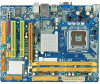
Biostar G41-M7 Setup Manual
Biostar G41-M7 Manual
 |
View all Biostar G41-M7 manuals
Add to My Manuals
Save this manual to your list of manuals |
Biostar G41-M7 manual content summary:
- Biostar G41-M7 | Setup Manual - Page 1
G41-M7 Setup Manual FCC Information and Copyright This equipment has been tested and found to can radiate radio frequency energy and, if not installed and used in accordance with the instructions, may cause harmful interference to radio communications. There is no guarantee that interference will - Biostar G41-M7 | Setup Manual - Page 2
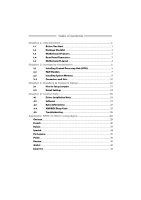
How to Setup Jumpers 12 3.2 Detail Settings 12 Chapter 4: Useful Help 18 4.1 Driver Installation Note 18 4.2 Software 19 4.3 Extra Information 23 4.4 AMI BIOS Beep Code 25 4.5 Troubleshooting 26 Appendix: SPEC In Other Languages 28 German...28 French ...30 Italian...32 Spanish - Biostar G41-M7 | Setup Manual - Page 3
INTRODUCTION G41-M7 1.1 BEFORE YOU START Thank you for choosing our product. Before you start installing the motherboard, please make sure you follow the instructions below: „ Prepare a dry and stable working environment with sufficient lighting. „ Always disconnect the computer from power outlet - Biostar G41-M7 | Setup Manual - Page 4
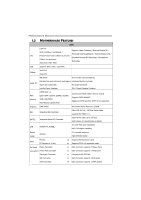
Motherboard Manual 1.3 MOTHERBOARD FEATURES SPEC LGA 775 Supports Hyper-Threading / Execute Disable Bit / Intel Core2Duo / Core2Quad / Enhanced Intel SpeedStep® / Intel Architecture-64 / CPU Pentium Dual-Core / Celeron Dual-Core / Extended Memory 64 Technology / Virtualization Celeron 4xx - Biostar G41-M7 | Setup Manual - Page 5
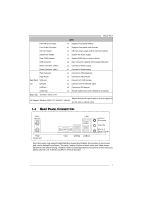
G41-M7 SPEC Front Panel Connector x1 Supports front panel facilities Front Audio Connector x1 Supports front panel audio function CPU Fan Header x1 CPU Fan power supply (with Smart Fan function) System Fan Header x1 System Fan Power supply Clear CMOS Header x1 Restore CMOS data to factory - Biostar G41-M7 | Setup Manual - Page 6
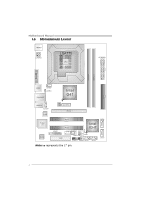
Motherboard Manual 1.5 MOTHERBOARD LAYOUT JKBMS1 JATXPWR 1 LGA775 CPU1 JAT XPWR2 D D R 2_A1 D D R 2_B1 JVGA1 JUSB1 JCFAN 1 JUSBV1 JRJ45USB1 Intel G41 ID E1 BI OS JAUDIO1 JAUDIO F1 LAN BAT TER Y PEX16_1 Super I/O Codec PCI1 Intel PCI2 ICH7 JUS B2 JPRNT1 JCOM1 JSFAN1 FDD1 JUSBV2 - Biostar G41-M7 | Setup Manual - Page 7
G41-M7 CHAPTER 2: HARDWARE INSTALLATION 2.1 INSTALLING CENTRAL PROCESSING UNIT (CPU) Special Notice: Remove Pin Cap before installation, and make good preservation for future use. When the CPU is removed, cover the Pin Cap on the empty socket to ensure pin legs won't be damaged. Pin-Cap Step 1: Pull - Biostar G41-M7 | Setup Manual - Page 8
Motherboard Manual Step 2: Look for the triangular cut edge on socket, and the golden dot on CPU should point forwards this triangular cut edge. The CPU will fit only in the correct orientation. Step 2-1: Step 2-2: Step 3: Hold the CPU down firmly, and then lower the lever to locked position to - Biostar G41-M7 | Setup Manual - Page 9
G41-M7 2.2 FAN HEADERS These fan headers support cooling-fans built in the computer. The fan cable and connector may be different due to the fan manufacturer. Connect the fan cable to the connector while matching the black wire to pin#1. JCFAN1: CPU Fan Header 1 4 Pin Assignment 1 Ground 2 Power 3 - Biostar G41-M7 | Setup Manual - Page 10
DD R2_A1 DD R2_B1 Motherboard Manual 2.3 INSTALLING SYSTEM MEMORY A. DDR2 module 1. Unlock a DIMM slot by pressing the retaining clips outward. Align a DIMM on the slot such that the notch on the DIMM matches the - Biostar G41-M7 | Setup Manual - Page 11
DDR2_A1 DDR2_B1 DDR2 Module 256MB/512MB/1GB/2GB 256MB/512MB/1GB/2GB G41-M7 Total Memory Size Max is 4GB. C. Dual Channel Memory Installation Please refer to the following requirements to activate Dual Channel function: Install memory module of the same density in pairs, shown in the table. Dual - Biostar G41-M7 | Setup Manual - Page 12
Motherboard Manual 2.4 CONNECTORS AND SLOTS FDD1: Floppy Disk Connector The motherboard provides a standard floppy disk connector that supports 360K, 720K, 1.2M, 1.44M and 2.88M floppy disk types. This connector supports the provided floppy drive ribbon cables. 2 34 1 33 IDE1: Hard Disk - Biostar G41-M7 | Setup Manual - Page 13
G41-M7 PEX16_1: PCI-Express x16 Slot - PCI-Express 1.0a compliant. - Maximum theoretical realized bandwidth of 4GB/s simultaneously per direction, for an aggregate of 8GB/s totally. - PCI-Express supports a raw bit-rate of 2.5Gb/s on the data pins. - 2X bandwidth over the traditional PCI - Biostar G41-M7 | Setup Manual - Page 14
Motherboard Manual CHAPTER 3: HEADERS & JUMPERS SETUP 3.1 HOW TO SETUP JUMPERS The closed 3.2 DETAIL SETTINGS Pin1-2 closed JPANEL1: Front Panel Header This 16-pin connector includes Power-on, Reset, HDD LED, Power LED, and speaker connection. It allows user to connect the PC case's front panel - Biostar G41-M7 | Setup Manual - Page 15
G41-M7 JATXPWR2: ATX Power Source Connector This connector allows user to connect 24-pin power connector on the ATX power supply. 12 24 1 13 Pin Assignment 13 +3.3V 14 -12V 15 Ground 16 PS_ON 17 Ground 18 Ground 19 Ground 20 NC 21 +5V 22 + - Biostar G41-M7 | Setup Manual - Page 16
Motherboard Manual JUSB2/JUSB3: Headers for USB 2.0 Ports at Front Panel This motherboard provides 2 USB 2.0 10 NC JAUDIOF1: Front Panel Audio Header This header allows user to connect the front audio output cable with the PC front panel. This header allows only HD audio front panel connector; AC' - Biostar G41-M7 | Setup Manual - Page 17
G41-M7 JCMOS1: Clear CMOS Header Placing the jumper on pin2-3 allows user to restore the BIOS safe setting and the CMOS data. Please carefully follow the procedures to avoid damaging the motherboard. 3 1 Pin 1-2 Close: Normal Operation (Default). 3 1 3 Pin 2-3 Close: 1 Clear CMOS data. ※ - Biostar G41-M7 | Setup Manual - Page 18
Motherboard Manual JUSBV1/JUSBV2: Power Source Headers for USB Ports Pin 1-2 Close: JUSBV1: +5V JUSBV1 1 3 JUSBV2 1 3 Pin 1-2 close 1 3 Pin 2-3 close JCOM1: Serial port Connector The motherboard has a Serial Port Connector for connecting RS-232 Port. 2 10 1 9 Pin Assignment 1 Carrier detect - Biostar G41-M7 | Setup Manual - Page 19
JPRNT1: Printer Port Connector This header allows you to connector printer on the PC. G41-M7 2 1 Pin Assignment 1 -Strobe 2 -ALF 3 Data 0 4 -Error 5 Data 1 6 -Init 7 Data 2 8 -Scltin 9 Data 3 10 Ground 11 Data 4 12 Ground 13 Data 5 25 Pin Assignment 14 Ground 15 - Biostar G41-M7 | Setup Manual - Page 20
window didn't show up after you insert the Driver CD, please use file browser to locate and execute the file SETUP.EXE under your optical drive. A. Driver Installation To install the driver, please click on the Driver icon. The setup guide will list the compatible driver for your motherboard and - Biostar G41-M7 | Setup Manual - Page 21
4.2 SOFTWARE G41-M7 Installing Software 1. Insert the Setup CD to the optical drive. The drivers installation program would appear if the Autorun function has been enabled. 2. Select Software Installation, and then click on the respective software title. 3. Follow the on-screen instructions to - Biostar G41-M7 | Setup Manual - Page 22
you to enter file name. Enter the file name and then click "Save". Your system information will be saved to a .txt file. Open the saved .txt file, you will see your system information including motherboard/BIOS/CPU/video/ device/OS information. This information is also concluded in the sent mail - Biostar G41-M7 | Setup Manual - Page 23
G41-M7 BIOS Update BIOS Update is a convenient utility which allows you to update your motherboard BIOS under Windows system. AWARD BIOS Show current BIOS information AMI BIOS Clear CMOS function (Only for AWARD BIOS) Save current BIOS to a .bin file Update BIOS with a BIOS file - Biostar G41-M7 | Setup Manual - Page 24
Motherboard Manual Before doing this, please download the proper BIOS file from the website. For AWARD BIOS, update BIOS procedure should be run with Clear CMOS function, so please check on Clear CMOS first. Then click Update BIOS button, a dialog will show for asking you backup - Biostar G41-M7 | Setup Manual - Page 25
G41-M7 4.3 EXTRA INFORMATION CPU Overheated If the system shutdown automatically after power on system for seconds, that means the CPU protection function has been activated. When the CPU is over heated, the motherboard will shutdown automatically to avoid a damage of the CPU, and the system may not - Biostar G41-M7 | Setup Manual - Page 26
chip. To enter the utility, press during the Power-On Self Tests (POST) procedure while booting up. Updating BIOS with BIO-Flasher 1. Go to the website to download the latest BIOS file for the motherboard. 2. Then, save the BIOS file into a USB pen drive or a floppy disk. 3. Insert the USB - Biostar G41-M7 | Setup Manual - Page 27
(system video adapter) Troubleshooting POST BIOS Beep Codes Number of Beeps Troubleshooting Action 1, 3 Reseat the memory, or replace with known good modules. Fatal error indicating a serious problem with the system. Consult your system manufacturer. Before declaring the motherboard beyond - Biostar G41-M7 | Setup Manual - Page 28
Motherboard Manual 4.5 TROUBLESHOOTING Probable Solution 1. There is no power in the system. 1. Make sure power cable is Power LED does not shine; the securely plugged in. fan of the power supply does not 2. Replace cable. work 3. Contact technical support or "CMOS Failure." Review system's - Biostar G41-M7 | Setup Manual - Page 29
G41-M7 This page is intentionally left blank. 27 - Biostar G41-M7 | Setup Manual - Page 30
Motherboard Manual APPENDIX: SPEC IN OTHER LANGUAGES GERMAN Spezifikationen LGA 775 Unterstützt Hyper-Threading / Execute Disable Bit / Intel Core2Duo / Core2Quad / Enhanced Intel SpeedStep® / IntelArchitecture-64 / CPU Pentium Dual-Core / Celeron Dual-Core / Extended Memory 64 Technology / - Biostar G41-M7 | Setup Manual - Page 31
CPU-Lüfterstromversorgungsanschluss (mit Smart x1 Fan-Funktion) System-Lüfter-Sockel x1 System-Lüfter-Stromversorgungsanschluss "CMOS LAN-Anschluss x1 USB-Anschluss x4 Audioanschluss x3 Platinengröße 182 mm (B) X 235 mm (L) OS-Unterstüt Windows 2000 / XP / Vista 32 / Vista 64 zung Biostar - Biostar G41-M7 | Setup Manual - Page 32
Motherboard Manual FRENCH SPEC LGA 775 Prend en charge les technologies Hyper-Threading / Processeurs Intel Core2Duo / Core2Quad d'exécution de bit de désactivation / Intel SpeedStep® UC / PentiumDual-Core / Celeron Dual-Core / optimisée/ d'architecture Intel 64 / de mémoire Celeron 4xx é - Biostar G41-M7 | Setup Manual - Page 33
G41-M7 SPEC Connecteur de Port d'imprimante x1 Chaque connector prend en charge Port LAN x1 arrière Port USB x4 Fiche audio x3 Dimensions 182 mm (l) X 235 mm (H) de la carte Biostar se réserve le droit d'ajouter ou de supprimer le Support SE Windows 2000 / XP / Vista 32 / Vista 64 support - Biostar G41-M7 | Setup Manual - Page 34
Motherboard Manual ITALIAN SPECIFICA CPU LGA 775 Processore Intel Core2Duo / Core2Quad / Pentium Dual-Core / Celeron Dual-Core / Celeron 4xx (Watt massimo: 95W) Supporto di Hyper-Threading / Execute Disable Bit / Enhanced Intel SpeedStep® / Architettura Intel 64 / Tecnologia Extended Memory 64 - Biostar G41-M7 | Setup Manual - Page 35
x1 Mouse PS/2 x1 I/O Porta VGA x1 pannello Porta LAN x1 posteriore Porta USB x4 Connettore audio x3 Dimension 182 mm (larghezza) x 235 mm i scheda (altezza) Sistemi Biostar si riserva il diritto di aggiungere o Windows 2000 / XP / Vista 32 / Vista operativi rimuovere il supporto - Biostar G41-M7 | Setup Manual - Page 36
Motherboard Manual SPANISH Especificación LGA 775 Admite Hyper-Threading / Bit de deshabilitación de Procesador Intel Core2Duo / Core2Quad / ejecución / Intel SpeedStep® Mejorado / Intel CPU Pentium Dual-Core / Celeron Dual-Core / Architecture-64 / Tecnología Extended Memory 64 / Celeron - Biostar G41-M7 | Setup Manual - Page 37
G41-M7 CPU (con en placa función Smart Fan) Cabecera de ventilador de sistema X1 Fuente de alimentación de ventilador de sistema Cabecera de borrado de CMOS 235 Mm. (H) la placa Soporte de sistema Windows 2000 / XP / Vista 32 / Vista 64 operativo Biostar se reserva el derecho de añadir o retirar - Biostar G41-M7 | Setup Manual - Page 38
Motherboard Manual PORTUGUESE ESPECIFICAÇÕES LGA 775 Processador Intel Core2Duo / Core2Quad Suporta as tecnologias Hyper-Threading / Execute CPU / PentiumDual-Core / Celeron Dual-Core / Disable Bit / Enhanced Intel SpeedStep® / Intel Celeron 4xx Arquitecture -64 / Extended Memory 64 / - Biostar G41-M7 | Setup Manual - Page 39
/S Rato PS/2 x1 aídas no Porta VGA x1 painel Porta LAN x1 traseiro Porta USB x4 Tomada de áudio x3 Tamanho da placa 182 mm (L) X 235 mm (A) Sistemas A Biostar reserva-se o direito de adicionar ou remover operativos Windows 2000 / XP / Vista 32 / Vista 64 suporte para qualquer sistema - Biostar G41-M7 | Setup Manual - Page 40
Motherboard Manual POLISH SPEC Procesor LGA 775 Obsługa Hyper-Threading / Execute Disable Bit / Procesor Intel Core2Duo / Core2Quad / Enhanced Intel SpeedStep® / Intel Architecture-64 / Pentium Dual-Core / Celeron Dual-Core / Extended Memory 64 Technology / Virtualization Celeron 4xx Technology - Biostar G41-M7 | Setup Manual - Page 41
G41-M7 SPEC Złącze napędu dyskietek x1 Każde złącze obsługuje 2 napędy Port VGA x1 I/O Port LAN x1 Port USB x4 Gniazdo audio x3 Wymiary płyty 182 mm (S) X 235 mm (W) Obsluga systemu Windows 2000 / XP / Vista 32 / Vista 64 operacyjne go Biostar zastrzega sobie prawo dodawania lub - Biostar G41-M7 | Setup Manual - Page 42
Motherboard Manual RUSSIAN СПЕЦ LGA 775 CPU Hyper-Threading / Execute Intel Core2Duo / Core2Quad / Disable Bit / Enhanced Intel SpeedStep® / Intel Pentium Dual-Core / Celeron Dual-Core / ый Architecture-64 / Extended Memory 64 Technology / Celeron 4xx 95W) FSB 800 / - Biostar G41-M7 | Setup Manual - Page 43
G41-M7 СПЕЦ IDE 2 x1 SATA x4 1 SATA x1 x1 x1 x1 CMOS x1 USB 2 USB x2 24 вывод) x1 4 вывод) x1 PS/2 x1 PS/2 x1 панель Порт VGA x1 LAN x1 USB-порт x4 ода x3 182 мм (Ш) X 235 мм (В) - Biostar G41-M7 | Setup Manual - Page 44
Motherboard Manual ARABIC LGA 775 Hyper-Threading / Execute Disable Bit Intel Core2Duo / Core2Quad Enhanced Intel SpeedStep® / Intel Architecture-64 / Pentium Dual-Core / Celeron Dual-Core Extended Memory 64 Technology / Virtualization Celeron 4xx Technology )و: 95 - Biostar G41-M7 | Setup Manual - Page 45
1 IDE 4 SATA 1 1 1 1 1 CMOS 2 USB 24 1 4 1 1 PS/2 1 PS/2 1 VGA 1 4 USB 3 182 235 X Biostar Windows 2000 / XP / Vista 32 / Vista 64 - Biostar G41-M7 | Setup Manual - Page 46
Motherboard Manual JAPANESE 仕様 LGA 775 Hyper-Threading / Execute Disable Bit / Enhanced Intel Intel Core2Duo / Core2Quad / SpeedStep® / Intel Architecture-64 / Extended CPU Pentium Dual-Core / Celeron Dual-Core / Memory 64 Technology / Virtualization Technologyをサ Celeron 4xx processor - Biostar G41-M7 | Setup Manual - Page 47
G41-M7 仕様 PCIスロット x2 スロット PCI Express x16スロット x1 x1 2 x1 1 x1 IDEコネクタ x1 2つのIDE SATAコネクタ x4 1つのSATA x1 ネクタ CPU x1 x1 CPU x1 CMOS x1 USBコネクタ 2 USB x2 ます 24ピン) x1 4ピン) x1 PS/2 x1 PS/2マウス x1 VGAポート x1 I/O LAN
-
 1
1 -
 2
2 -
 3
3 -
 4
4 -
 5
5 -
 6
6 -
 7
7 -
8
-
9
-
10
-
11
-
12
-
13
-
14
-
15
-
16
-
17
-
18
-
19
-
20
-
21
-
22
-
23
-
24
-
25
-
26
-
27
-
28
-
29
-
30
-
31
-
32
-
33
-
34
-
35
-
36
-
37
-
38
-
39
-
40
-
41
-
42
-
43
-
44
-
45
-
46
-
47
 |
 |

G41-M7 Setup Manual
FCC Information and Copyright
This equipment has been tested and found to comply with the limits of a Class
B digital device, pursuant to Part 15 of the FCC Rules. These limits are designed
to provide reasonable protection against harmful interference in a residential
installation. This equipment generates, uses, and can radiate radio frequency
energy and, if not installed and used in accordance with the instructions, may
cause harmful interference to radio communications. There is no guarantee
that interference will not occur in a particular installation.
The vendor makes no representations or warranties with respect to the
contents here and specially disclaims any implied warranties of merchantability
or fitness for any purpose. Further the vendor reserves the right to revise this
publication and to make changes to the contents here without obligation to
notify any party beforehand.
Duplication of this publication, in part or in whole, is not allowed without first
obtaining the vendor’s approval in writing.
The content of this user’s manual is subject to be changed without notice and
we will not be responsible for any mistakes found in this user’s manual. All the
brand and product names are trademarks of their respective companies.