
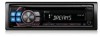
Alpine CDE-125BT Owner's Manual (english)
Alpine CDE-125BT Manual
 |
UPC - 793276711700
View all Alpine CDE-125BT manuals
Add to My Manuals
Save this manual to your list of manuals |
Alpine CDE-125BT manual content summary:
- Alpine CDE-125BT | Owner's Manual (english) - Page 1
WMA/AAC CD RECEIVER WITH BLUETOOTH® EN CDE-126BT MP3 CD RECEIVER WITH BLUETOOTH® FR CDE-125BT ES • OWNER'S MANUAL Please read before using this equipment. • MODE D'EMPLOI Veuillez lire avant d'utiliser cet appareil. • MANUAL DE OPERACIÓN Léalo antes de utilizar este equipo. ALPINE ELECTRONICS - Alpine CDE-125BT | Owner's Manual (english) - Page 2
- Alpine CDE-125BT | Owner's Manual (english) - Page 3
Contents Operating Instructions WARNING WARNING 5 CAUTION 5 PRECAUTIONS 5 CAUTION 7 Getting Started Accessory List 8 Turning Power On and Off 8 Detaching and Attaching the Front Panel ........ 8 Initial System Start-Up 8 Adjusting Volume 8 Lowering Volume Quickly 8 Setting Time 9 Radio - Alpine CDE-125BT | Owner's Manual (english) - Page 4
20 Setting the Received Calls automatically (Auto Answer 20 Deleting a BLUETOOTH Device from the list 20 Displaying the phone service provider name 21 Adjusting the volume for the microphone input 21 Selecting the output speaker 21 Displaying the firmware version 21 Updating the firmware 21 - Alpine CDE-125BT | Owner's Manual (english) - Page 5
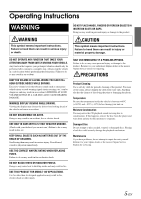
important instructions. Failure to heed them can result in serious injury or death. CAUTION This symbol means important instructions. Failure PROBLEM APPEARS. Failure to do so may cause personal injury or damage to the product. Return it to your authorized Alpine dealer or the nearest Alpine Service - Alpine CDE-125BT | Owner's Manual (english) - Page 6
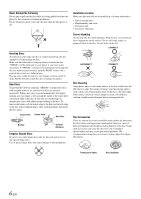
them will influence the thickness and/or diameter of the disc. Using such accessories can cause the disc to be out of standard specifications and may create operational problems. We recommend not using these accessories on discs played in Alpine CD players. Transparent Sheet Disc Stabilizer 6-EN - Alpine CDE-125BT | Owner's Manual (english) - Page 7
settings of the USB memory type, memory state or encoding software, the unit may not play back or display properly. • A file that is copy-protected (copyright protection) cannot be played back. • USB memory may take time to start playback. If there is a particular file other than audio in the USB - Alpine CDE-125BT | Owner's Manual (english) - Page 8
it locks firmly into the main unit. (Release) / /ENT /MUTE Accessory List • Head unit 1 • Power cable 1 • Interface cable for iPod (CDE-126BT only 1 • Microphone (4m 1 • Mounting sleeve 1 • Carrying case 1 • Bracket key 2 • Screw (M5 × 8 4 • Owner's Manual 1 set Turning Power On and Off - Alpine CDE-125BT | Owner's Manual (english) - Page 9
this, the time will advance one hour. • Pressing /MUTE will return to the previous mode. • If no operation is performed for 60 seconds, the unit will return to normal mode automatically. Controllable with Remote Control This unit can be controlled with an optional Alpine remote control. For details - Alpine CDE-125BT | Owner's Manual (english) - Page 10
change every time the button is pressed. TUNER DISC USB AUDIO iPod*1/AUX+*2 AUX*3 TUNER *1 Displayed only when the iPod/iPhone is connected and AUX+ SETUP is set to OFF, refer to "Setting the AUX+ SETUP Mode" (page 19). *2 Displayed only when the AUX+ SETUP is set to ON, refer to "Setting the AUX - Alpine CDE-125BT | Owner's Manual (english) - Page 11
inch (8 cm) CDs cannot be used. CDE-126BT (compatible with MP3/WMA/AAC)/ CDE-125BT (compatible with MP3): • The CD-player can play discs containing audio data, MP3 data deactivate repeat play. * In the USB mode, all files stored in the USB memory are played back in random sequence, and the " - Alpine CDE-125BT | Owner's Manual (english) - Page 12
For discs without CD Text, searches are made using the track numbers associated with each song. 1 Press /ESC during play. This will set the search Audio data is compressed using software with MP3/WMA/AAC codecs. For details on creating MP3/WMA/AAC files, refer to the user's manual for that software - Alpine CDE-125BT | Owner's Manual (english) - Page 13
sound is sampled (recorded) 44,100 times per second. The higher the sampling rate, the higher the sound quality, but also the larger the volume of data. Encoding Converting music CDs, WAVE (AIFF) files, and other sound files into the specified audio compression format. Tag Song information such - Alpine CDE-125BT | Owner's Manual (english) - Page 14
AUDIO/LOUD) BAND /ESC SOUND/SETUP Setting the Bass Center Frequency 2-1 Press BAND to select the desired bass center frequency. 80 Hz 100 Hz 200 Hz 60 Hz 80 Hz Emphasizes the displayed bass frequency ranges. Setting the unit automatically returns to normal mode. * When the subwoofer mode is set to - Alpine CDE-125BT | Owner's Manual (english) - Page 15
. • When the TEXT SCR is set to SCR MANU, press and hold VIEW for at least 2 seconds, the current text will be scrolled one time (except Radio mode). The display in Radio mode: FREQUENCY CLOCK FREQUENCY The display in CD mode: TRACK NO./ELAPSED TIME TRACK NO./CLOCK TEXT (DISC NAME)*1 TEXT (TRACK - Alpine CDE-125BT | Owner's Manual (english) - Page 16
to the portable device. TUNER DISC USB AUDIO iPod*1/AUX+*2 AUX TUNER *1 Displayed only when the iPod/iPhone is connected and AUX+ SETUP is set to OFF, refer to "Setting the AUX+ SETUP Mode" (page 19). *2 Displayed only when the AUX+ SETUP is set to ON, refer to "Setting the AUX+ SETUP Mode" (page 19 - Alpine CDE-125BT | Owner's Manual (english) - Page 17
MANUAL Set the DIMMER control to AUTO to decrease the illumination brightness of the unit with the head lights of the vehicle ON. This mode is useful if you feel the unit's backlighting is too bright at night. • The function is inoperable when the ILLUMINATI is set to other than TYPE1 for CDE-126BT - Alpine CDE-125BT | Owner's Manual (english) - Page 18
supply of the built-in amplifier. POW OFF: Use this mode when the line output of this unit is used to drive an external amplifier. In this setting, the head unit's internal amplifier is turned OFF and cannot drive speakers. CDE-126BT: Amplifier Amplifier Front left Front right Rear left Rear right - Alpine CDE-125BT | Owner's Manual (english) - Page 19
to the Owner's Manual of the connected device(s). Before Using Hands-Free Function Before using the hands-free phone function, the following settings need to be made. Set "BT IN" to BT ADAPTER (page 17). • Before using a hands-free phone, it must be paired with this unit. Refer to "BLUETOOTH SETUP - Alpine CDE-125BT | Owner's Manual (english) - Page 20
to a BLUETOOTH compatible device (Pairing) For details on the control from a BLUETOOTH compatible device, refer to the Owner's Manual of the BLUETOOTH compatible device. 1 Set a BLUETOOTH connection from a BLUETOOTH compatible device. 2 The PIN code ("0000") is displayed on the connected unit. • The - Alpine CDE-125BT | Owner's Manual (english) - Page 21
version will be displayed. Updating the firmware Setting item: FW UPDATE With this setting, the BLUETOOTH firmware update function can be activated, but other devices and software may be required. For details, consult ALPINE website. Hands-Free Phone Control About the Hands-Free Phone Hands - Alpine CDE-125BT | Owner's Manual (english) - Page 22
on the recognition range of the mobile phone and mounting location of the microphone. Note when the microphone is mounted. • Voice dial operation depends on the function of the mobile phone. For details, refer to the Owner's Manual of the mobile phone. • If a called person that you say is not found - Alpine CDE-125BT | Owner's Manual (english) - Page 23
models. MP3 WMA AAC CDE-126BT CDE-125BT 1 Press SOURCE/ to switch to the USB AUDIO mode. The mode will change every time the button is pressed. TUNER DISC USB AUDIO iPod*1/AUX+*2 AUX*3 TUNER *1 Displayed only when the iPod/iPhone is connected and AUX+ SETUP is set to OFF, refer to "Setting - Alpine CDE-125BT | Owner's Manual (english) - Page 24
File Systems This device supports FAT 16/32 for USB memory device. / /MUTE /ESC /ENT Preset buttons (1 through 6) VIEW An iPod/iPhone can be connected to this unit by using the proprietary ALPINE FULL SPEED Connection Cable (KCE-433iV) (Supplied, CDE-126BT only). When this unit is connected by - Alpine CDE-125BT | Owner's Manual (english) - Page 25
the iPod mode. TUNER DISC USB AUDIO iPod*1/AUX+*2 AUX*3 TUNER *1 Displayed only when the iPod/iPhone is connected and AUX+ SETUP is set to OFF, refer to "Setting the AUX+ SETUP Mode" (page 19). *2 Displayed only when the AUX+ SETUP is set to ON, refer to "Setting the AUX+ SETUP Mode" (page 19 - Alpine CDE-125BT | Owner's Manual (english) - Page 26
by that artist are searchable. • This function is inactive during shuffle ( ) playback. Random Play Shuffle (M.I.X.) The Shuffle function of the iPod/iPhone is displayed as unit. on this Shuffle Albums: The songs on each album are played back in proper order. Upon completion of all the songs on - Alpine CDE-125BT | Owner's Manual (english) - Page 27
is not supported by the unit. Information In Case of Difficulty If you encounter a problem, please turn the power off, then on again. If the unit is still not functioning normally, please review the items in the following checklist. This guide will help you isolate the problem if the unit is at - Alpine CDE-125BT | Owner's Manual (english) - Page 28
disc should be replaced. Error displays (built-in CD player only). • Mechanical error. - Press . After the error indication disappears, insert the disc again. If the above-mentioned solution does not solve the problem, consult your nearest Alpine dealer. CD-R/CD-RW playback not possible. • Close - Alpine CDE-125BT | Owner's Manual (english) - Page 29
-protected files. • Caused by the iPod/iPhone Software Version not being compatible with this unit. - Update the iPod/iPhone Software Version to be compatible with this unit. • The iPod/iPhone is not verified. - Reset the iPod. - Try another iPod/iPhone, if available. NO SUPPORT • Text information - Alpine CDE-125BT | Owner's Manual (english) - Page 30
response may differ depending on the encoder software/bit rate. BLUETOOTH SECTION BLUETOOTH Specification Output Power HFP HSP BLUETOOTH V 2.0 +4 dBm Max. (Power class 2) (Hands-Free Profile) (Head Set Profile) GENERAL Power Requirement 14.4 V DC (11-16 V allowable) Power Output 18 W RMS - Alpine CDE-125BT | Owner's Manual (english) - Page 31
control of the vehicle and cause fire etc. KEEP SMALL OBJECTS SUCH AS BATTERIES OUT OF THE REACH OF CHILDREN. Swallowing them may result in serious injury. If swallowed, consult a physician immediately. DO NOT INSTALL IN LOCATIONS WHICH MIGHT HINDER VEHICLE OPERATION, SUCH AS THE STEERING WHEEL - Alpine CDE-125BT | Owner's Manual (english) - Page 32
CDE-126BT/CDE-125BT into the dashboard until it clicks. This ensures that the unit is properly locked and will not accidentally come out from the dashboard. Install the detachable front panel. Removal 1. Remove the detachable front panel. 2. Insert the bracket keys into the unit, along the guides - Alpine CDE-125BT | Owner's Manual (english) - Page 33
Connections (Blue) POWER ANT (Blue/White) REMOTE TURN-ON (Pink/Black) AUDIO INTERRUPT IN (Orange) (Red) (Yellow) ILLUMINATION IGNITION BATTERY (Black) GND CDE-126BT only (Gray) SPEAKER RIGHT FRONT (Gray/Black) (Violet/Black) SPEAKER RIGHT REAR (Violet) (Green) SPEAKER LEFT REAR (Green/ - Alpine CDE-125BT | Owner's Manual (english) - Page 34
only) RED is right and WHITE is left. MIC Input Connector To Microphone. RCA Extension Cable (sold separately) Full Speed Connector Control iPod/iPhone signals. Connect this to an iPod/iPhone by using FULL SPEED Connection Cable (KCE-433iV) (Supplied, CDE-126BT only) or to an external device (such - Alpine CDE-125BT | Owner's Manual (english) - Page 35
or failure to follow instructions contained in the Owner's manual. D Damage caused by act of God, including without limitation, earthquake, fire, flood, storms or other acts of nature. Any cost or expense related to the removal or reinstallation of the product. E Service performed by an unauthorized - Alpine CDE-125BT | Owner's Manual (english) - Page 36
cause undesired operation of this device. FCC WARNING Changes or modifications not expressly approved by the party responsible for compliance could void the user de Importador País de origen Fuente de alimentación CDE-126BT MP3/WMA/AAC CD RADIO CON BLUETOOTH® Ampliaudio S.A. de C.V. Av, Urbina No.
-
 1
1 -
 2
2 -
 3
3 -
 4
4 -
 5
5 -
 6
6 -
 7
7 -
8
-
9
-
10
-
11
-
12
-
13
-
14
-
15
-
16
-
17
-
18
-
19
-
20
-
21
-
22
-
23
-
24
-
25
-
26
-
27
-
28
-
29
-
30
-
31
-
32
-
33
-
34
-
35
-
36
 |
 |
Designed by ALPINE Japan
68-16909Z35-A
EN
FR
ES
MP3/WMA/AAC CD RECEIVER WITH BLUETOOTH
®
CDE-126BT
MP3 CD RECEIVER WITH BLUETOOTH
®
CDE-125BT
•
OWNER’S MANUAL
Please read before using this equipment.
•
MODE D’EMPLOI
Veuillez lire avant d’utiliser cet appareil.
•
MANUAL DE OPERACIÓN
Léalo antes de utilizar este equipo.
ALPINE ELECTRONICS MARKETING, INC.
1-1-8 Nishi Gotanda,
Shinagawa-ku,
Tokyo 141-0031, Japan
Phone 03-5496-8231
ALPINE ELECTRONICS OF AMERICA, INC.
19145 Gramercy Place, Torrance,
California 90501, U.S.A.
Phone 1-800-ALPINE-1 (1-800-257-4631)
ALPINE ELECTRONICS OF CANADA, INC.
777 Supertest Road, Toronto,
Ontario M3J 2M9, Canada
Phone 1-800-ALPINE-1 (1-800-257-4631)
ALPINE ELECTRONICS OF AUSTRALIA PTY. LTD.
161-165 Princes Highway, Hallam
Victoria 3803, Australia
Phone 03-8787-1200
ALPINE ELECTRONICS GmbH
Wilhelm-Wagenfeld-Str. 1-3, 80807 München,
Germany
Phone 089-32 42 640
ALPINE ELECTRONICS OF U.K. LTD.
Alpine House
Fletchamstead Highway, Coventry CV4 9TW, U.K.
Phone 0870-33 33 763
ALPINE ELECTRONICS FRANCE S.A.R.L.
(RCS PONTOISE B 338 101 280)
98, Rue de la Belle Etoile, Z.I. Paris Nord Il,
B.P. 50016, 95945 Roissy Charles de Gaulle
Cedex, France
Phone 01-48638989
ALPINE ITALIA S.p.A.
Viale C. Colombo 8, 20090 Trezzano
Sul Naviglio (MI), Italy
Phone 02-484781
ALPINE ELECTRONICS DE ESPAÑA, S.A.
Portal de Gamarra 36, Pabellón, 32
01013 Vitoria (Alava)-APDO 133, Spain
Phone 945-283588
ALPINE ELECTRONICS (BENELUX) GmbH
Leuvensesteenweg 510-B6,
1930 Zaventem, Belgium
Phone 02-725-13 15
R